
The PayNet Open Finance Platform (OFP) is a Financial-grade API (FAPI) platform based on OpenID Connect and OAuth 2.0 standards. It enables secure, user-consented sharing of financial data between institutions.
There are three main parties involved:
PayNet OFP exposes two key server components:
Before you start, you can simulate the User Experience as an End User starting from DC Simulator, Paynet Aggregator, and DP Simulator, for Consent Initiation up to Retrieve Balance Flow.
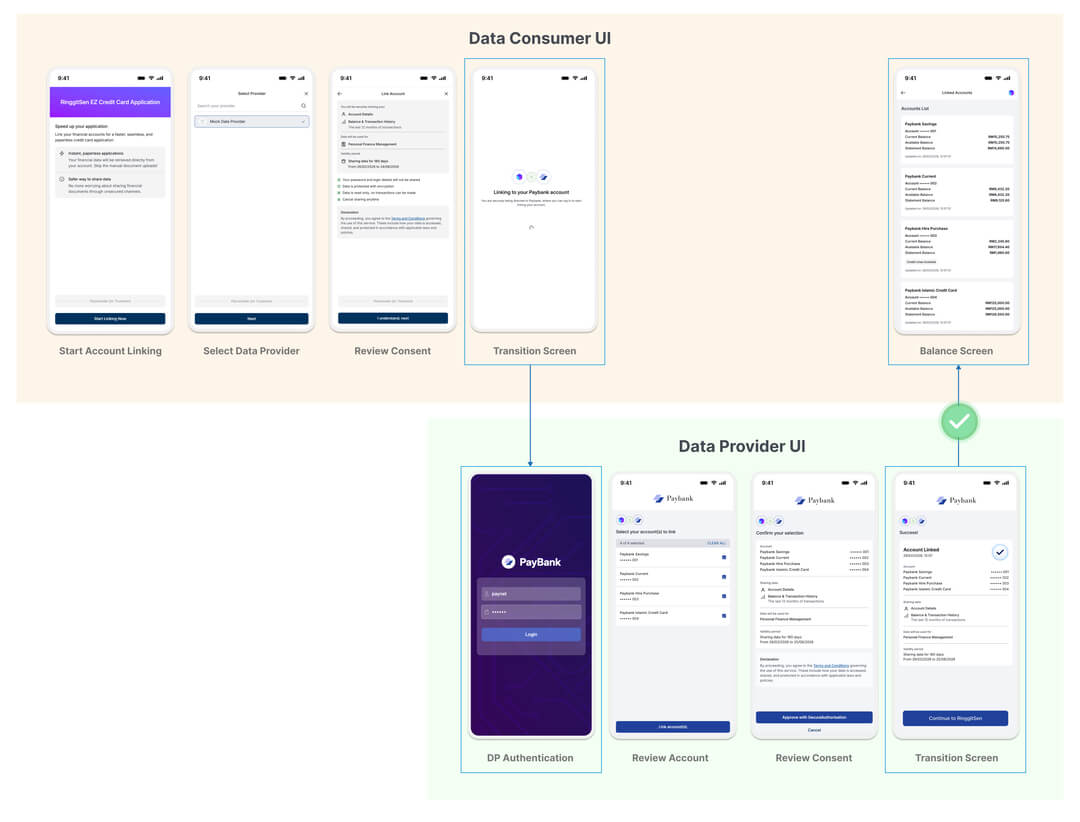
Run this Journey
paynetpaynetIn this period, PayNet will support manual onboarding for participants into PayNet Open Finance Platform.
PayNet OFP uses multiple certificate-based security protocols. You must submit the appropriate certificates for each protocol.
Protocols requiring certificates:
| Protocol | Purpose |
|---|---|
| mTLS | Mutual TLS, authenticates both client and server at the transport layer |
| JWS | JSON Web Signature, signs API request/response payloads to prevent tampering |
| JAR | JWT-Secured Authorization Request, secures the PAR authorization request |
| JWE | JSON Web Encryption, encrypts sensitive financial data in API responses |
How to Submit the Certificates and Redirection URL:
Detailed instructions on how to submit the certificates and redirection URL will be provided during the onboarding process.
Client Credentials are used for machine-to-machine (M2M) calls specifically, when your DC system calls PayNet without direct end-user involvement (e.g. consent management operations).
How to Get these Credentials:
After submitting your Security Certificates and Redirection URL, you will receive an email reply containing your credentials the next business day.
All endpoints marked ✅ require Mutual TLS (mTLS). For outbound calls from your DC to PayNet, present your registered client certificate. For inbound webhook endpoints, your server must require and validate the client certificate presented by the caller. Access tokens issued over mTLS are sender-constrained, so the same certificate used during token issuance must be presented on protected Resource Server calls.
| Endpoint | Method | mTLS Required | Who Establishes mTLS | Notes |
|---|---|---|---|---|
/.well-known/openid-configuration |
GET | ❌ | - | Public endpoint |
/oauth/jwks/ofm |
GET | ❌ | - | Public endpoint |
/oauth/jwks/{dp_id} |
GET | ❌ | - | Public endpoint |
/v1/oauth/authorize |
GET | ❌ | - | Browser redirect |
/v1/oauth/par |
POST | ✅ | DC -> PayNet AS | Authorization Server |
/v1/oauth/token |
POST | ✅ | DC -> PayNet AS | Authorization Server |
/v1/oauth/introspect |
POST | ✅ | DC -> PayNet AS | Authorization Server |
/v1/oauth/revoke |
POST | ✅ | DC -> PayNet AS | Authorization Server |
/v1/oauth/userinfo |
GET | ✅ | DC -> PayNet RS | Bearer token + mTLS |
/v1/providers |
GET | ✅ | DC -> PayNet RS | Sender-constrained token |
/v1/consents/{consent_id} |
GET | ✅ | DC -> PayNet RS | Sender-constrained token |
/v1/consents/{consent_id}/revoke |
POST | ✅ | DC -> PayNet RS | Sender-constrained token |
/v1/accounts/{account_id} |
GET | ✅ | DC -> PayNet RS | Sender-constrained token |
/v1/accounts/{account_id}/balances |
GET | ✅ | DC -> PayNet RS | Sender-constrained token |
/v1/accounts/{account_id}/transactions |
GET | ✅ | DC -> PayNet RS | Sender-constrained token |
Your DC application must provide a user-facing interface that guides the end user through the account linking and consent journey. At minimum, this should include:
Refer to the sample of UI mockup provided below for the expected screen flows as a Data Consumer:
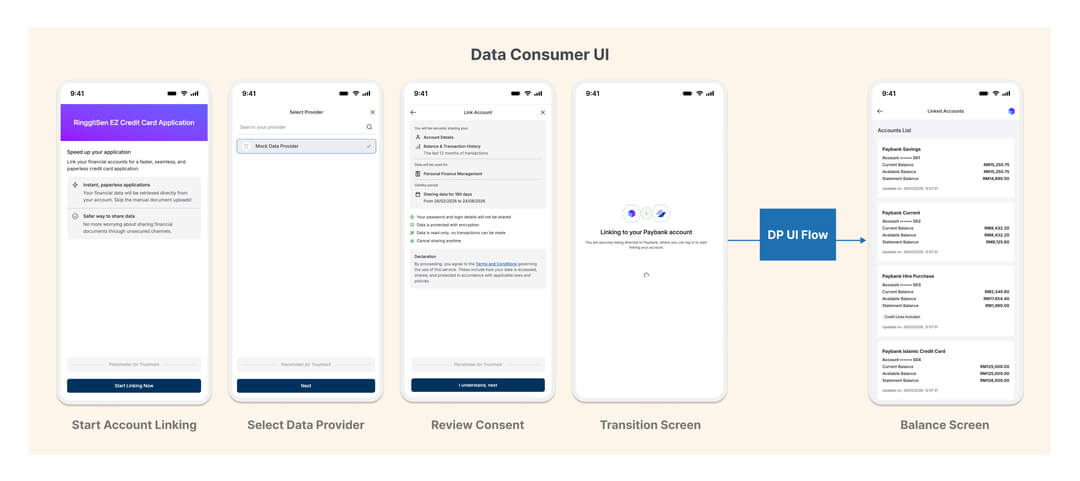
Positive Scenario: End User Approves Consent
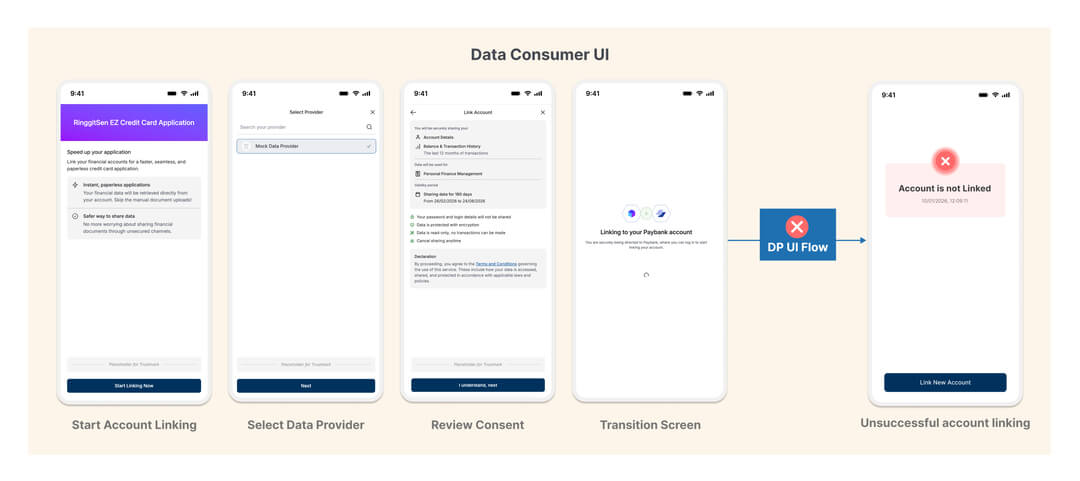
Negative Scenario: End User Rejects/Cancels Consent
Your backend must implement the following endpoints:
PayNet OFP supports two FAPI 2.0 client authentication methods for Data Consumers. Your DC may use either method based on what was registered during onboarding.
private_key_jwttls_client_auth (Mutual TLS / mTLS)private_key_jwtFor this method, include the following x-www-form-urlencoded parameters in authenticated Authorization Server requests.
| Parameter | Required | Description |
|---|---|---|
client_assertion_type |
✅ | Must be urn:ietf:params:oauth:client-assertion-type:jwt-bearer |
client_assertion |
✅ | Signed JWS assertion generated with your registered private key |
client_id |
❌ | Not required for private_key_jwt because client identity is asserted in the JWT claims |
The signed JWS must use PS256, and its kid must match your registered certificate thumbprint (x5t#S256).
JWS Header
| Element | Required | Description |
|---|---|---|
alg |
✅ | Must be PS256 |
kid |
✅ | Base64url-encoded SHA-256 thumbprint (x5t#S256) of your X.509 certificate |
JWS Body (Claims)
| Claim | Required | Description |
|---|---|---|
iss |
✅ | Client ID |
sub |
✅ | Client ID |
aud |
✅ | Authorization Server issuer value from /.well-known/openid-configuration |
exp |
✅ | Expiry Unix timestamp (maximum 10 minutes from iat) |
iat |
✅ | Issued-at Unix timestamp |
jti |
✅ | Unique JWT ID used to prevent replay attacks |
nbf |
Optional | Not-before Unix timestamp |
tls_client_authFor this method, the DC authenticates using mTLS and provides the following parameter:
| Parameter | Required | Description |
|---|---|---|
client_id |
✅ | Registered Data Consumer ID |
When a token is issued over mTLS, it is sender-constrained. The same client certificate must be presented on subsequent Resource Server calls using that token.
The table below shows whether endpoint-level client authentication is required and which method applies.
| Endpoint | Auth Required | Notes |
|---|---|---|
GET /.well-known/openid-configuration |
❌ Not Required | Public endpoint |
GET /oauth/jwks/* |
❌ Not Required | Public endpoint |
POST /v1/oauth/par |
✅ Required | private_key_jwt or tls_client_auth |
GET /v1/oauth/authorize |
❌ Not Required | Browser redirect |
GET /v1/oauth/token |
✅ Required | All grant types |
POST /v1/oauth/introspect |
✅ Required | private_key_jwt or tls_client_auth |
POST /v1/oauth/revoke |
✅ Required | private_key_jwt or tls_client_auth |
GET /v1/oauth/userinfo |
❌ Not Required | Authenticated via Bearer access token |
| Resource Server endpoints | ❌ Not Required | Authenticated via Bearer access token + mTLS |
Use this flow when your DC backend needs to call PayNet on its own behalf, for example, to retrieve consent information or perform consent lifecycle management (get, revoke).
Endpoint:
POST https://{AS_URL}/v1/oauth/token
Content-Type: application/x-www-form-urlencoded
x-fapi-interaction-id: <UUID>
Request Parameters:
| Parameter | Required | Description |
|---|---|---|
grant_type |
✅ | Must be client_credentials |
client_id |
Conditional | Required for tls_client_auth; not required for private_key_jwt |
client_assertion_type |
Conditional | Required for private_key_jwt; must be urn:ietf:params:oauth:client-assertion-type:jwt-bearer |
client_assertion |
Conditional | Required for private_key_jwt; signed JWS client assertion |
scope |
Optional | Scope of the access token |
🔒 This request must be made over mTLS using the certificate bound to your client_id.
curl --location --request POST 'https://{AS_URL}/v1/oauth/token' \
  --header 'Content-Type: application/x-www-form-urlencoded' \
  --header 'x-fapi-interaction-id: <UUID>' \
  --cert /path/to/client.crt \
  --key /path/to/client.key \
  --data-urlencode 'grant_type=client_credentials' \
  --data-urlencode 'client_id=<YOUR_CLIENT_ID>' \
  --data-urlencode 'client_assertion_type=urn:ietf:params:oauth:client-assertion-type:jwt-bearer' \
  --data-urlencode 'client_assertion=<SIGNED_CLIENT_ASSERTION_JWT>'
Successful Response (200):
PayNet returns an access_token. Use this token as a Bearer token in subsequent M2M API calls (e.g. consent retrieval, consent revocation).
This is the first step in the user-facing consent journey. Your DC backend sends a Pushed Authorization Request (PAR) to PayNet to register the consent parameters securely before redirecting the user.
Sequence Overview
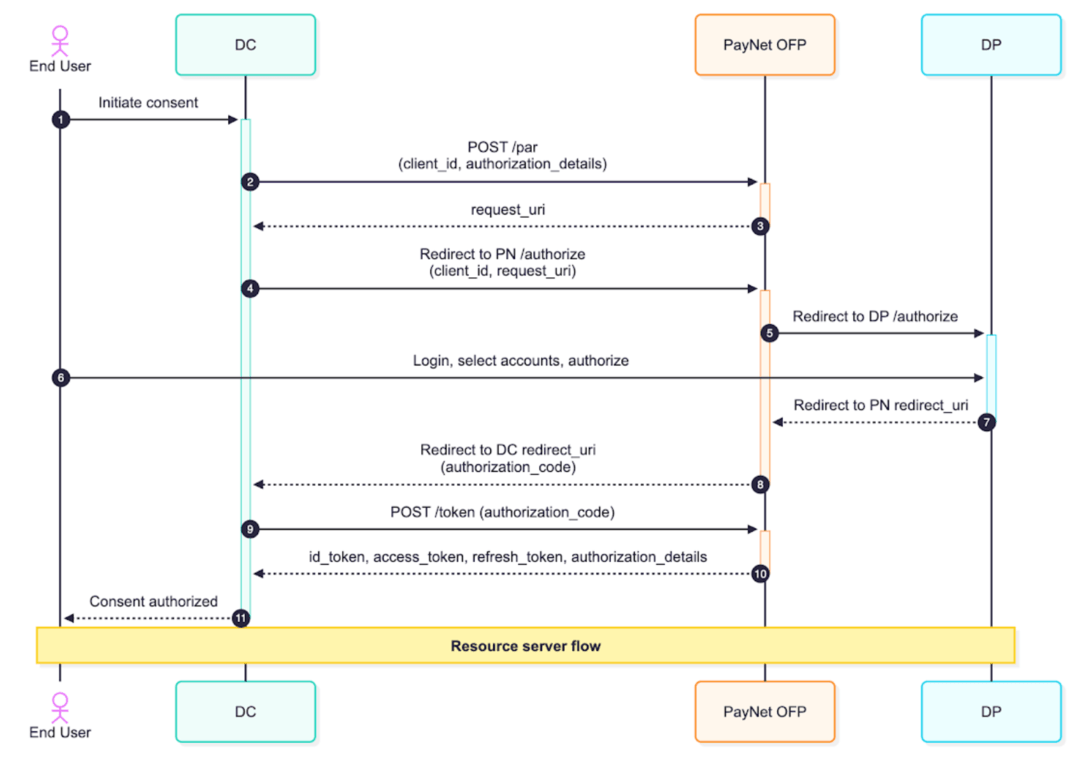
DC Responsibilities are:
Step 2: Send the PAR Request
Endpoint:
POST https://{AS_URL}/v1/oauth/par
Content-Type: application/x-www-form-urlencoded
🔒 This request must be made over mTLS using the certificate bound to your client_id.
curl --location --request POST 'https://{AS_URL}/v1/oauth/par' \
  --header 'Content-Type: application/x-www-form-urlencoded' \
  --header 'x-fapi-interaction-id: <UUID>' \
  --cert /path/to/client.crt \
  --key /path/to/client.key \
  --data-urlencode 'client_id=<YOUR_CLIENT_ID>' \
  --data-urlencode 'request=<SIGNED_JAR_JWT>'
Step 3: Redirect the User
PayNet responds with a request_uri. Your DC must then redirect the end user's browser to PayNet's /authorize endpoint with the client_id and request_uri as query parameters.
Step 4: PayNet Redirects to the DP
PayNet redirects the user's browser to the Data Provider's (DP's) authorization page (HTTP 303). The user logs in at their bank, selects which accounts to share, reviews the consent, and approves or rejects.
Step 8: Handle the Callback
After the user completes authorization at the DP, PayNet redirects the user back to your redirect_url with an authorization_code and state parameter appended.
⚠️ Security check: Validate that the state value in the callback matches what you originally sent in the PAR request. Also validate the iss parameter matches the PayNet AS issuer URL from the .well-known endpoint.
Step 9: Completing Authorization & Exchanging the Authorization Code for Tokens
Once your DC receives the authorization_code from the redirect callback, your backend must immediately exchange it for tokens.
Endpoint:
POST https://{AS_URL}/v1/oauth/token
Content-Type: application/x-www-form-urlencoded
x-fapi-interaction-id: <UUID>
Request Parameters:
| Parameter | Required | Description |
|---|---|---|
grant_type |
✅ | Must be authorization_code |
code |
✅ | The authorization_code received from the redirect callback |
redirect_uri |
✅ | Must match the redirect URL registered in the Participant Portal |
code_verifier |
✅ | The PKCE code verifier. Must match the code_challenge sent in the original PAR request |
client_id |
Conditional | Required for tls_client_auth; not required for private_key_jwt |
client_assertion_type |
Conditional | Required for private_key_jwt; must be urn:ietf:params:oauth:client-assertion-type:jwt-bearer |
client_assertion |
Conditional | Required for private_key_jwt; signed JWS client assertion |
🔒 This request must be made over mTLS using the certificate bound to your client_id.
curl --location --request POST 'https://{AS_URL}/v1/oauth/token' \
  --header 'Content-Type: application/x-www-form-urlencoded' \
  --header 'x-fapi-interaction-id: <UUID>' \
  --cert /path/to/client.crt \
  --key /path/to/client.key \
  --data-urlencode 'grant_type=authorization_code' \
  --data-urlencode 'code=<AUTHORIZATION_CODE>' \
  --data-urlencode 'redirect_uri=<YOUR_REDIRECT_URI>' \
  --data-urlencode 'client_id=<YOUR_CLIENT_ID>' \
  --data-urlencode 'client_assertion_type=urn:ietf:params:oauth:client-assertion-type:jwt-bearer' \
  --data-urlencode 'client_assertion=<SIGNED_CLIENT_ASSERTION_JWT>' \
  --data-urlencode 'code_verifier=<PKCE_CODE_VERIFIER>'
Successful Response (200):
| Token | Description |
|---|---|
access_token |
Use this to call Resource APIs (Account, Balance, Transactions) on behalf of the user |
refresh_token |
Use this to obtain a new access_token once the current one expires |
id_token |
Contains the user's identity claims. Must be verified using the DP's public certificate (available via PayNet's JWKS endpoint) |
authorization_details |
Confirms the scope and accounts covered by this consent |
⚠️ code_verifier is mandatory for Authorization Code flow. Omitting it will result in an invalid_grant error.
🔒 The authorization_code is single-use and short-lived. Exchange it immediately. PayNet invalidates it after use.
💡 Token Refresh: When the access_token expires, send a POST /token request with grant_type=refresh_token and the stored refresh_token to obtain a new access_token without requiring the user to re-authorize.
Once you have a valid access_token, you can call the Resource Server to retrieve financial data.
Sequence Overview
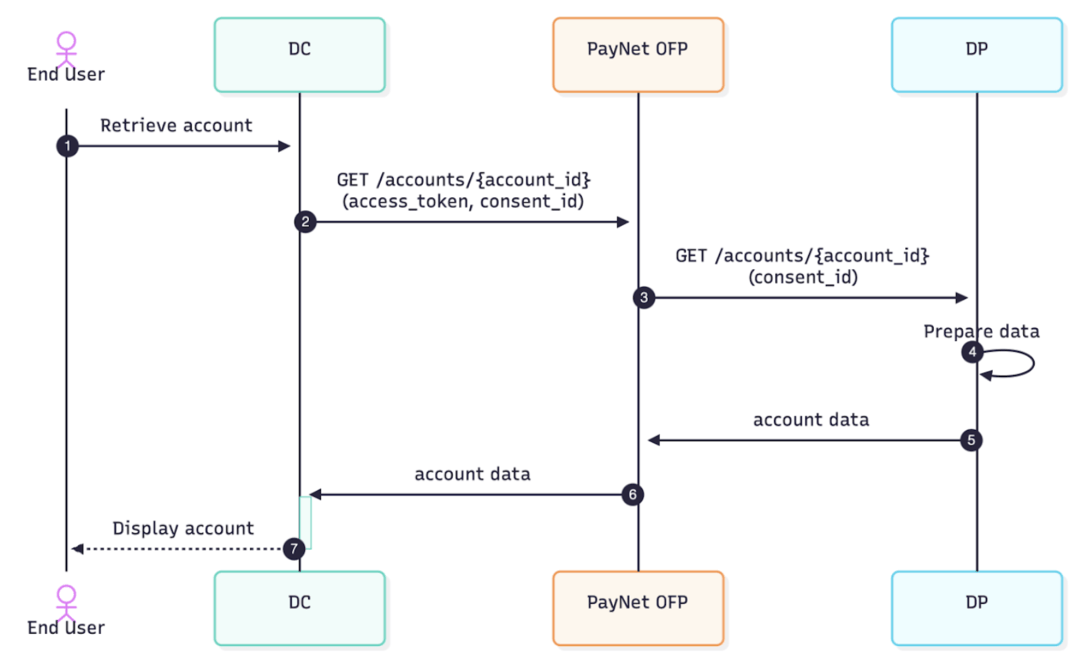
Retrieve Consent
Retrieve the existing consent record using Consent ID of the account linked. DC may use this endpoint to obtain the list of accounts associated with that consent, before then able to retrieve the balance data of each accounts.
GET https://{RS_URL}/v1/consents/{consent_id}
Authorization: Bearer {access_token}
x-fapi-interaction-id: <UUID>
x-signature: <JWS signed header>
x-enc-kid: <KID of your DC encryption certificate>| Header | Description |
|---|---|
Authorization |
Bearer token, the access_token |
x-fapi-interaction-id |
A unique UUID for request tracing and correlation |
x-signature |
A JWS-signed representation of the request, signed with your DC JWS certificate |
x-enc-kid |
The Key ID (KID) of your DC encryption (JWE) certificate, tells the DP which key to use when encrypting the response |
🔒 This request must be made over mTLS using the certificate bound to your client_id.
curl -X GET 'https://rs.paynet-ofp.com/v1/consents/c8f1a2b3-4d5e-6f7a-8b9c-0d1e2f3a4b5c' \
  --cert   'dc-client.crt' \
  --key    'dc-client.key' \
  --cacert 'paynet-ca.crt' \
  -H 'x-fapi-interaction-id: f47ac10b-58cc-4372-a567-0e02b2c3d479' \
  -H 'authorization: Bearer eyJhbGciOiJQUzI1NiIsImtpZCI6ImRjLXNpZy0wMSJ9..<access_token>' \
  -H 'x-fapi-signature: eyJhbGciOiJQUzI1NiIsImtpZCI6ImRjLXNpZy0wMSIsImlzcyI6ImRjLTEyMyIsImp0aSI6ImY0N2FjMTBiLTU4Y2MtNDM3Mi1hNTY3LTBlMDJiMmMzZDQ3OSIsImlhdCI6MTcwOTYwNjQwMH0..<signature>'
Get Account Balance Endpoint:
GET https://{RS_URL}/v1/accounts/{account_id}/balances
Authorization: Bearer {access_token}
x-fapi-interaction-id: <UUID>
x-signature: <JWS signed header>
x-enc-kid: <KID of your DC encryption certificate>
Key Request Headers:
| Header | Description |
|---|---|
Authorization |
Bearer token, the access_token |
x-fapi-interaction-id |
A unique UUID for request tracing and correlation |
x-signature |
A JWS-signed representation of the request, signed with your DC JWS certificate |
x-enc-kid |
The Key ID (KID) of your DC encryption (JWE) certificate, tells the DP which key to use when encrypting the response |
🔒 This request must be made over mTLS using the certificate bound to your client_id.
curl --location --request GET 'https://{RS_URL}/v1/accounts/{account_id}/balances' \
  --header 'Authorization: Bearer <ACCESS_TOKEN>' \
  --header 'x-fapi-interaction-id: <UUID>' \
  --header 'x-signature: <SIGNED_JWS>' \
  --header 'x-enc-kid: <DC_ENCRYPTION_CERT_KID>' \
  --cert /path/to/client.crt \
  --key /path/to/client.key
Response:
The response is returned as a JWE (encrypted) payload wrapped inside a JWS (signed) envelope. Your DC must:
Balance Object fields include:
| Field | Description |
|---|---|
account_id |
Unique identifier for the linked account |
current_balance |
Real-time balance excluding pending transactions |
💡 The same pattern applies to other Resource APIs later: GET Account and GET Account Transactions follow the same authentication, signing, and decryption requirements.
This section applies to both Data Consumer (DC) and Data Provider (DP) integrations and summarizes security controls required by PayNet OFP.
The platform uses X.509 certificates published via JWKS endpoints for signature verification and encryption key discovery.
| Certificate Type | Description |
|---|---|
| PN Signature Certificate | PayNet signs payloads using its private key; receivers verify using PN public key from JWKS (use = sig). |
| DC Signature Certificate | DC signs requests (for applicable flows); receivers verify using DC public key from JWKS (use = sig). |
| DP Signature Certificate | DP signs responses; receivers verify using DP public key from JWKS (use = sig). |
| DC Encryption Certificate | DP encrypts sensitive payloads for DC using DC public key indicated by x-enc-kid; DC decrypts using matching private key (use = enc). |
During key rotation, previous and new keys may coexist with different
kidvalues. Cache JWKS responses for a maximum of 15 minutes.
mTLS is required for financial-grade transport security. Both parties authenticate each other at the TLS layer.
The following Authorization Server endpoints require mTLS:
POST /v1/oauth/introspectPOST /v1/oauth/revokeGET /v1/oauth/userinfoJWS ensures integrity and non-repudiation of payloads.
alg=PS256.kid identifies the signing certificate thumbprint (x5t#S256).nbf, iat, exp) and jti help prevent replay attacks.| Header | Purpose |
|---|---|
x-signature |
Carries detached/compact JWS signature for request integrity verification. |
x-enc-kid |
Identifies DC encryption certificate key ID for DP JWE encryption. |
x-fapi-interaction-id |
Correlation ID for tracing; should align with jti usage where applicable. |
Authorization |
Bearer access token for protected endpoints. |
Content-Type |
Uses application/jwt where payloads are JWS (and may contain JWE). |
This is your primary integration test and should be completed before any live DP pairing. It uses PayNet's pre-built Mock DP, allowing you to test the full end-to-end flow in a controlled environment.
Pre-work Checklist
Before starting, confirm the following are complete:
End-to-End Test Journey
The following table describes each step of the test, which party drives it, and the expected outcomes as per UI, Backend API, and API Integration Guide in the previous sections. You can focus on the bold rows for your DC testing purpose.
| Step | Actor | Action | UI Expected Outcome | Backend Expected Outcome from DC |
|---|---|---|---|---|
| 1 | Real DC | User navigates to the account linking screen | Linking screen displayed | (Handled by Frontend) |
| 2 | Real DC | User lands on the Data Provider List page | Data Provider List displayed with available providers | Call GET /providers and render the provider list |
| 3 | Real DC | User selects a Data Provider from the list | User proceeds to Consent Request page | (Handled by Frontend; store selected provider_id and authorization_server_url) |
| 4 | Real DC | User reviews consent details on the Consent Request page | Consent Request screen displayed with scope, purpose, duration | (Handled by Frontend) |
| 5 | Real DC | User clicks "I understand, next" to confirm consent | User is redirected to Mock DP UI | Call POST /par then redirect to PN /authorize |
| 6 | Mock DP | User is redirected to the Mock DP login page | Mock DP login screen displayed | - |
| 7a | Mock DP | User logs in with valid preset credentials (positive) | Login succeeds; account selection screen displayed | - |
| 7b | Mock DP | User enters incorrect password (negative) | Login fails; error message displayed | - |
| 8 | Mock DP | User selects one or more accounts to link | Accounts selected | - |
| 9 | Mock DP | User reviews consent at the DP side | Consent review screen displayed | - |
| 10a | Mock DP | User approves consent (positive) | User redirected to DP success page | - |
| 10b | Mock DP | User rejects consent (negative) | User redirected back to DC with rejection error | - |
| 11 | Mock DP | User gets Success confirmation and click Back to DC | User redirected back to DC with authorization_code |
Handle callback and token exchange |
| 12a | Real DC | Consent approved callback received | DC retrieves and displays account balance | DC exchanges code for token /token then calls /v1/accounts/{account_id}/balances |
| 12b | Real DC | Consent rejected callback received | DC displays "Account not linked" message to user | Update consent status in UI/backend state |
Definition of Done
Your integration is considered complete for this phase when all of the following have been demonstrated with your Certificates and Credentials:
access_token, refresh_token, and id_tokenaccess_token and successfully decrypt and display the responseThis phase tests interoperability with a ready DP in a controlled bilateral pairing session.
⚠️ Important prerequisite: The Data Provider must have also passed testing before this phase can proceed.
How to proceed:
Once the above prerequisite is met, contact PayNet to schedule and align a bilateral testing session with a Real DP. PayNet will facilitate the pairing and provide guidance on the specific test scenarios to execute.
| Code | Description |
|---|---|
| 200 | OK |
| 201 | Created |
| 204 | No Content |
| 303 | Redirect |
| 400 | Bad Request |
| 401 | Unauthorized |
| 403 | Forbidden |
| 404 | Not Found |
| 405 | Method Not Allowed |
| 429 | Too Many Requests |
| 500 | Internal Server Error |
| 503 | Service Unavailable |
Returned in error responses from authorization and token endpoints.
| Code | Description |
|---|---|
| invalid_request | Missing or invalid parameter. |
| invalid_client | Client authentication failed. |
| invalid_grant | Invalid, expired, or revoked grant/code. |
| unauthorized_client | Client not authorized for this grant type. |
| unsupported_grant_type | Grant type not supported. |
| access_denied | Resource owner or AS denied the request. |
| invalid_scope | Invalid or unknown scope. |
| server_error | Unexpected server-side condition. |
| temporarily_unavailable | Server overloaded or in maintenance. |
| Code | Description |
|---|---|
| Consent.AccountTemporarilyBlocked | Account temporarily blocked by DP business rule. |
| Consent.PermanentAccountAccessFailure | Account permanently unavailable. |
| Consent.TransientAccountAccessFailure | Account unavailable due to transient failure. |
| AccessToken.InvalidScope | Token does not have required scope. |
| Consent.Invalid | Consent is in an invalid state. |
| Consent.BusinessRuleViolation | DP business rule prevents the operation. |
| JWS.InvalidSignature | JWS signature verification failed. |
| JWS.InvalidClaim | One or more JWS claims failed validation. |
| JWE.DecryptionError | JWE decryption failure. |
Error Response Body
{
  "error": "invalid_grant",
  "error_description": "The authorization code has expired."
}When receiving HTTP 429 (Too Many Requests), implement retry with exponential backoff to avoid overwhelming the platform.
| Attempt | Wait Time |
|---|---|
| Initial | Immediate |
| Retry 1 | 5 seconds |
| Retry 2 | 10 seconds |
| Retry 3 | 20 seconds |
| Retry 4 | 40 seconds |
The PayNet Open Finance Platform exposes a FAPI 2.0–compliant Authorization Server (AS) for OAuth 2.0 and OpenID Connect flows. Integrators should use discovery to obtain all AS endpoints and metadata instead of hardcoding URLs.
For this environment the AS issuer is https://api.as.openfinance.dev.inet.paynet.my.
Using the discovery (issuer) endpoint
Start from the issuer URL
You will receive the AS base URL (issuer) for your environment (e.g. from the Partner Dashboard or onboarding). The issuer is the logical identifier of the AS and must match the iss claim in tokens and authorization responses.
Fetch the discovery document Request the OpenID Connect / OAuth 2.0 metadata at:
https://api.as.openfinance.dev.inet.paynet.my/.well-known/openid-configuration
This document (see OpenID Connect Discovery 1.0 and RFC 8414) contains:issuer — the AS issuer URL (validate that it matches the iss in responses and tokens).authorization_endpoint, token_endpoint, jwks_uri, pushed_authorization_request_endpoint, userinfo_endpoint, and optionally introspection_endpoint, revocation_endpoint.Use the URLs from the discovery response Use these values for all subsequent requests (authorization, token exchange, PAR, UserInfo, JWKS). Do not hardcode paths; environments may differ.
{- "issuer": "string",
- "jwks_uri": "string",
- "pushed_authorization_request_endpoint": "string",
- "authorization_endpoint": "string",
- "token_endpoint": "string",
- "userinfo_endpoint": "string",
- "introspection_endpoint": "string",
- "revocation_endpoint": "string",
- "mtls_endpoint_aliases": {
- "pushed_authorization_request_endpoint": "string",
- "token_endpoint": "string",
- "userinfo_endpoint": "string",
- "introspection_endpoint": "string",
- "revocation_endpoint": "string"
}, - "response_types_supported": [
- "string"
], - "id_token_signing_alg_values_supported": [
- "string"
], - "scopes_supported": [
- "string"
], - "claims_supported": [
- "string"
], - "claim_types_supported": [
- "string"
], - "token_endpoint_auth_methods_supported": [
- "string"
], - "code_challenge_methods_supported": [
- "string"
], - "response_modes_supported": [
- "string"
], - "tls_client_certificate_bound_access_tokens": true,
- "authorization_details_types_supported": [
- "string"
], - "require_pushed_authorization_requests": true,
- "request_object_signing_alg_values_supported": [
- "string"
], - "request_parameter_supported": true,
- "request_uri_parameter_supported": true,
- "require_request_uri_registration": true,
- "token_endpoint_auth_signing_alg_values_supported": [
- "string"
], - "subject_types_supported": [
- "string"
], - "userinfo_signing_alg_values_supported": [
- "string"
], - "authorization_response_iss_parameter_supported": true
}| x-fapi-interaction-id | string <uuid> A UUID used as a correlation id |
| token required | string <= 36 characters The access token or refresh token to be introspected. |
| token_type_hint required | string <= 32 characters Enum: "access_token" "refresh_token" A hint about the type of the token submitted. |
{- "active": true,
- "scope": "string",
- "client_id": "string",
- "token_type": "string",
- "sub": "string",
- "iss": "string",
- "aud": "string",
- "nbf": 0,
- "exp": 0,
- "iat": 0,
- "jti": "string",
- "cnf": {
- "x5t#S256": "string"
}
}| x-fapi-interaction-id | string <uuid> A UUID used as a correlation id |
| client_id required | string <= 36 characters Client ID |
| request required | string <= 3000 characters JAR (JWT Secured Authorization Request) signed using the client's private key. It contains the authorization request parameters. Sample payload (claims inside the JWT, values show data types): {
"iss": "string",
"aud": "string",
"nbf": integer,
"exp": integer,
"iat": integer,
"jti": "string",
"client_id": "string",
"response_type": "string",
"redirect_uri": "string",
"scope": "string",
"state": "string",
"code_challenge": "string",
"code_challenge_method": "string",
"response_mode": "string",
"authorization_details": [
{
"type": "string",
"consent": {
"dc_id": "string",
"dp_id": "string",
"consent_type": "string",
"consent_purpose": "string",
"permissions": ["string"],
"expiration_datetime": "datetime"
}
}
],
"acr_values": "string"
}
|
{- "request_uri": "string",
- "expires_in": 0
}| x-fapi-interaction-id | string <uuid> A UUID used as a correlation id |
| token required | string <= 36 characters The token that the client wants to get revoked. |
| token_type_hint required | string <= 32 characters Enum: "access_token" "refresh_token" A hint about the type of the token submitted (e.g. access_token, refresh_token). |
| x-fapi-interaction-id | string <uuid> A UUID used as a correlation id |
| grant_type required | string <= 32 characters Enum: "client_credentials" "authorization_code" "refresh_token" Grant type: client_credentials (M2M), authorization_code (user flow), or refresh_token (obtain new access tokens). |
| client_id required | string <= 36 characters Client ID |
| scope | string <= 100 characters The scope of the access token being requested (e.g. accounts). Optional; for authorization_code/refresh_token, if specified must be equal to or a subset of the original scope. |
| code | string <= 36 characters Authorization code grant only. The authorization code issued by the Authorization Server. |
| redirect_uri | string <= 300 characters Authorization code grant only. The redirect_uri that was used in the original authorization request. |
| code_verifier | string <= 128 characters Authorization code grant only. The PKCE code verifier. |
| refresh_token | string <= 36 characters Refresh token grant only. The refresh token previously issued by the Authorization Server. |
{- "access_token": "string",
- "token_type": "Bearer",
- "expires_in": 0,
- "scope": "string",
- "id_token": "string",
- "refresh_token": "string",
- "authorization_details": [
- {
- "type": "string",
- "consent": {
- "consent_type": "string"
}
}
]
}| x-fapi-interaction-id | string <uuid> A UUID used as a correlation id |
| authorization required | string Bearer |
{- "name": "string",
- "sub": "string",
- "given_name": "string",
- "family_name": "string",
- "preferred_username": "string",
- "picture": "string",
- "email": "string",
- "email_verified": true,
- "id_type": "nric",
- "hashed_id_number": "string"
}DC retrieves account details from DP via PayNet.
| account_id required | string AccountID is the unique identifier for the account. |
{- "data": {
- "account_id": "string",
- "account_number": "string",
- "account_name": "string",
- "account_holder_name": "string",
- "institution_name": "string",
- "category": "string",
- "type": "string",
- "subtype": "string",
- "loan_details": {
- "loan_amount": {
- "amount": "string",
- "currency": "string"
}, - "origination_date": "string",
- "maturity_date": "string"
}, - "limit": {
- "amount": "string",
- "currency": "string"
}, - "interest_rate": 0,
- "minimum_payment_amount": {
- "amount": "string",
- "currency": "string"
}, - "payment_due_date": "string",
- "custom_data": {
- "property1": "string",
- "property2": "string"
}
}
}DC retrieves an account balances information from DP via PayNet.
| account_id required | string AccountID is the unique identifier for the account. |
{- "data": {
- "account_id": "string",
- "current_balance": {
- "amount": "string",
- "currency": "string",
- "credit_debit_indicator": "string"
}, - "available_balance": {
- "amount": "string",
- "currency": "string",
- "credit_debit_indicator": "string"
}, - "statement_balance": {
- "amount": "string",
- "currency": "string",
- "credit_debit_indicator": "string"
}, - "credit_lines_included": true,
- "statement_date": "string",
- "custom_data": {
- "property1": "string",
- "property2": "string"
}
}
}DC retrieves account transaction history from DP via PayNet.
| account_id required | string AccountID is the unique identifier for the account. |
| from_date | string FromDate filters transactions on or after this date (YYYY-MM-DD). Optional. |
| to_date | string ToDate filters transactions on or before this date (YYYY-MM-DD). Optional. |
| page_size | integer <int32> PageSize is the maximum number of transactions to return (1-100, default 25). |
| next_page_params | string NextPageParams is the opaque cursor for pagination continuation. |
{ }DC retrieves an existing consent using the consent ID. The DC may also use this endpoint to obtain the list of accounts associated with that consent.
| consent_id required | string ConsentID is the unique consent identifier (path parameter). |
{- "data": {
- "consent_id": "string",
- "dc_id": "string",
- "dp_id": "string",
- "id_type": "string",
- "hashed_id_number": "string",
- "consent_type": "string",
- "consent_purpose": "string",
- "permissions": [
- "string"
], - "expiration_datetime": "string",
- "status": "string",
- "status_reason": {
- "reason_code": "string",
- "reason_description": "string"
}, - "accounts": [
- {
- "account_id": "string",
- "account_number": "string",
- "account_name": "string"
}
], - "created_at": "string",
- "updated_at": "string",
- "updated_by": "string"
}
}List providers (directory). Returns providers with pagination.
| page_size | integer <int32> PageSize is the number of records per request (optional, default 100 per spec). Allowed range is 10-500. |
| next_page_params | string NextPageParams is the URL-encoded parameter string for the next page (300 chars). Opaque cursor params; clients must reuse exactly as returned. |
{- "data": [
- {
- "provider_id": "string",
- "name": "string",
- "status": "string",
- "provider_type": "string",
- "authorization_server_url": "string",
- "resource_server_url": "string",
- "supported_capabilities": [
- {
- "use_case": "string",
- "permissions": [
- "string"
]
}
]
}
], - "meta": {
- "next_page_params": "string"
}
}